

If you already have an agent, you can integrate it with Eval Protocol by using the RemoteRolloutProcessor. RemoteRolloutProcessor delegates rollout execution to a remote HTTP service that you control. It’s useful for implementing rollouts with your existing agent codebase by wrapping it in an HTTP service.

High Level Flow
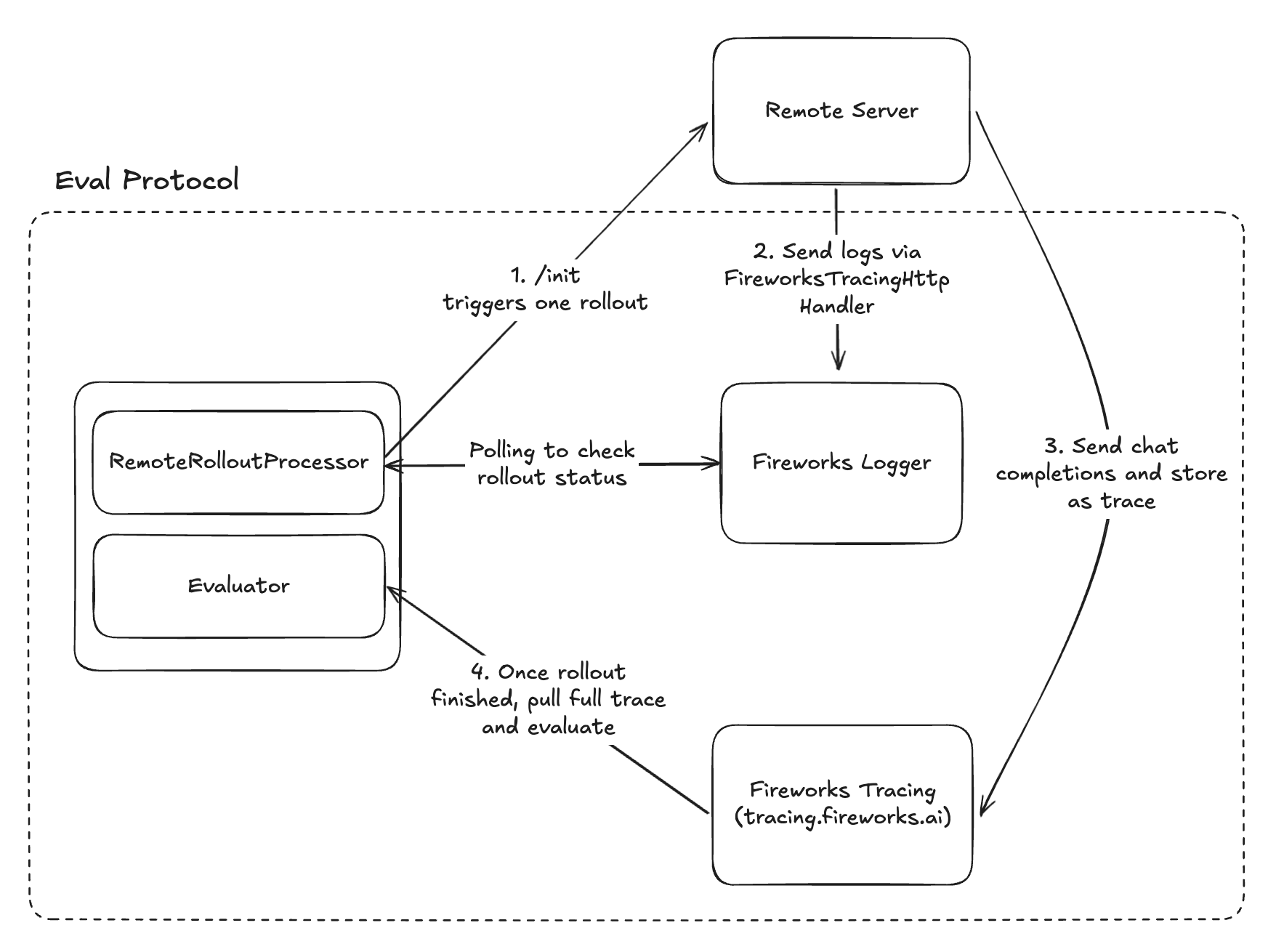
Remote Rollout Processor flow
  1. /init triggers one rollout: Eval Protocol calls your service’s POST /init with the row payload and correlation metadata.
  2. Send logs via FireworksTracingHttpHandler: Your service emits structured logs tagged with the rollout’s correlation fields.
  3. Send chat completions and store as trace: Your agent’s calls are recorded as traces in Fireworks.
  4. Once rollout finished, pull full trace and evaluate: Eval Protocol polls Fireworks for a completion signal, then loads the trace and scores it.
Everything inside the dotted box is handled by Eval Protocol — you only need to implement the Remote Server, more on this below.

API Contract

POST /init: We expect the remote service to implement a single /init endpoint that accepts an InitRequest with the following fields:
completion_params
object
required
Dictionary containing model and optional parameters like temperature, max_tokens, etc.
messages
array
Array of conversation messages
tools
array
Array of available tools for the model
model_base_url
string
Base URL for the remote server to make LLM calls
metadata
object
required
Rollout execution metadata for correlation
api_key
string
API key to be used by the remote server
init_request.json
{
    "completion_params": {
        "model": "accounts/fireworks/models/gpt-oss-120b",
        "temperature": 0.7,
        "max_tokens": 2048
    },
    "messages": [
        { "role": "user", "content": "What is the weather in San Francisco?" }
    ],
    "tools": [
        {
            "type": "function",
            "function": {
                "name": "get_weather",
                "description": "Get the weather for a city",
                "parameters": {
                    "type": "object",
                    "properties": {
                        "city": { "type": "string" }
                    }
                }
            }
        }
    ],
    "model_base_url": "https://tracing.fireworks.ai/rollout_id/brave-night-42/invocation_id/wise-ocean-15/experiment_id/calm-forest-28/run_id/quick-river-07/row_id/bright-star-91",
    "metadata": {
        "invocation_id": "wise-ocean-15",
        "experiment_id": "calm-forest-28",
        "rollout_id": "brave-night-42",
        "run_id": "quick-river-07",
        "row_id": "bright-star-91"
    },
    "api_key": "fw_your_api_key"
}

Metadata Correlation

When making model calls in your remote server, include the following metadata in your traces and logs so that eval-protocol can correlate them with the corresponding EvaluationRows during result collection. RemoteRolloutProcessor automatically generates this and sends it to the server, so you don’t need to worry about wrangling metadata.
  • invocation_id
  • experiment_id
  • rollout_id
  • run_id
  • row_id

Handling InitRequest in your Server

This section shows how to parse the InitRequest fields and call your model. Note: the model_base_url is a tracing.fireworks.ai URL that proxies your model calls so Fireworks can capture full traces for each rollout. Below is a minimal FastAPI server showing how to wire this together.
remote_server.py
@app.post("/init")
def init(req: InitRequest):
    if not req.messages:
        raise ValueError("messages is required")

    model = req.completion_params.get("model")
    if not model:
        raise ValueError("model is required in completion_params")

    # Spread all completion_params (model, temperature, max_tokens, etc.)
    completion_kwargs = {"messages": req.messages, **req.completion_params}

    if req.tools:
        completion_kwargs["tools"] = req.tools

    # Build OpenAI client from InitRequest
    # You can also use req.api_key instead of an environment variable if preferred.
    client = OpenAI(
        base_url=req.model_base_url,
        api_key=os.environ.get("FIREWORKS_API_KEY"),
    )
    completion = client.chat.completions.create(**completion_kwargs)

Signaling Rollout Completion

The RemoteRolloutProcessor detects rollout completion by polling structured logs sent to Fireworks Tracing. Your remote server should use the appropriate SDK for your language to emit structured completion statuses.
The eval-protocol JS/TS SDK provides equivalent helpers:
  • withFireworksLogging: Wraps your handler to automatically send structured logs to Fireworks Tracing.
  • createRolloutLogger: Creates a rollout-scoped logger tagged with the current rollout_id.
  • Status / mapOpenAIErrorToStatus: Helpers for emitting structured completion and error statuses.
api/init.ts
import type { VercelRequest, VercelResponse } from '@vercel/node';
import {
    initRequestSchema,
    type InitRequest,
    Status,
    createRolloutLogger,
    withFireworksLogging,
} from 'eval-protocol';

async function handler(req: VercelRequest, res: VercelResponse) {
    const initRequest: InitRequest = initRequestSchema.parse(req.body);

    // Extract rollout id from InitRequest payload and create rollout-specific logger
    const rolloutId = initRequest.metadata.rollout_id;
    const logger = createRolloutLogger(rolloutId);

    try {
        // Execute your rollout here

        const status = Status.rolloutFinished();
        logger.info(`Rollout ${rolloutId} completed`, { status });
    } catch (error: any) {
        const status = Status.rolloutInternalError(error.message);
        logger.error(`Rollout ${rolloutId} failed: ${error.message}`, { status });
    }
}

// Export wrapped handler so all logs go to Fireworks Tracing
export default withFireworksLogging(handler);

Alternative: Environment Variable Approach

For the following setups, you can use the EP_ROLLOUT_ID environment variable instead of manual filters:
  1. One rollout is processed per server instance
remote_server.py
import os
import logging
from eval_protocol import Status, InitRequest, FireworksTracingHttpHandler

# Configure Fireworks tracing handler
os.environ["EP_ROLLOUT_ID"] = request.metadata.rollout_id
fireworks_handler = FireworksTracingHttpHandler()
logging.getLogger().addHandler(fireworks_handler)
logger = logging.getLogger(__name__)

@app.post("/init") 
def init(request: InitRequest):    
    ...
  1. /init spawns separate Python processes
remote_server.py
import os
import logging
import multiprocessing
from eval_protocol import FireworksTracingHttpHandler, InitRequest

def execute_rollout_step_sync(request):
    # Set in the CHILD process
    os.environ["EP_ROLLOUT_ID"] = rollout_id
    logging.getLogger().addHandler(FireworksTracingHttpHandler())
    
    # Execute your rollout here

@app.post("/init")
async def init(request: InitRequest):
    # Do NOT set EP_ROLLOUT_ID here; set it in the child
    p = multiprocessing.Process(
        target=execute_rollout_step_sync,
        args=(request),
    )
    p.start()

How RemoteRolloutProcessor uses Fireworks Tracing

  1. Remote server logs completion: Uses Status.rollout_finished() or Status.rollout_error()
  2. RemoteRolloutProcessor polls: Searches logs by rollout_id tag until completion found
  3. Status extraction: Reads structured status fields (code, message, details)

Multi-Agent Setup Fine-tuning / Artifact Storage

One other use-case the RemoteRolloutProcessor enables is fine-tuning on multi-agent setups by storing artifacts. For example, let’s say you have a Deep Research multi-agent setup and you want to fine-tune the first subagent, but the evaluation is on the artifact produced at the end of this entire multi-agent pipeline, e.g. the final deep research output. To accomplish this, we must store the artifact and correlate it with the subagent’s output. Pass custom data in the extras field when logging completion status:
Only log Status.rolloutFinished() after the entire pipeline completes and the final artifact is ready—not immediately when the subagent finishes. The completion log signals that evaluation can begin, so it must include all artifacts needed for scoring.
api/init.ts
// Wait for full pipeline to complete, then log with extras
const status = Status.rolloutFinished();
logger.info(`Rollout ${rolloutId} completed`, { 
    status, 
    extras: {
        messages: result.messages,
        research_report: result.report,
        sources: result.citations,
    } 
});
The RemoteRolloutProcessor automatically extracts extras from the completion log and stores them in row.execution_metadata.extra. Access them in your evaluation function:
test_deep_research.py
@evaluation_test(
    input_dataset=[str(Path(__file__).parent / "research_dataset.jsonl")],
    completion_params=[{"model": "accounts/fireworks/models/gpt-oss-120b"}],
    rollout_processor=RemoteRolloutProcessor(
        remote_base_url="https://your-server.vercel.app",
    ),
)
async def deep_research_evaluation(row: EvaluationRow) -> EvaluationRow:
    # Access artifacts stored by your remote server
    research_report = row.execution_metadata.extra["research_report"]
    sources = row.execution_metadata.extra["sources"]
    
    # Evaluate the final artifact
    row.evaluation_result = evaluate_report_quality(research_report, sources)
    return row

Handling Rollout Failures

Rollouts can fail for various reasons: your remote server might crash, tracing might fail, or the model might not produce an assistant response. The RemoteRolloutProcessor automatically detects these failures and sets row.rollout_status accordingly. The most common failure is when the rollout produces no assistant response. The SDK detects this and sets row.rollout_status to Internal (13) with the message “Rollout finished with the same number of messages as the original row”.
Even when a rollout fails, your evaluation function is still called—giving you control over how to handle errors.
Best practice: Check row.rollout_status.is_error() at the start of your evaluation function to catch failed rollouts. This method returns True when the status code is INTERNAL:
test_my_eval.py
from eval_protocol import EvaluateResult, EvaluationRow, evaluation_test
from eval_protocol.pytest import RemoteRolloutProcessor

@evaluation_test(
    input_dataset=["dataset.jsonl"],
    rollout_processor=RemoteRolloutProcessor(
        remote_base_url="https://your-server.vercel.app",
    ),
    completion_params=[{"model": "accounts/fireworks/models/gpt-oss-120b"}],
)
def test_my_evaluation(row: EvaluationRow) -> EvaluationRow:
    # Check if rollout failed with internal error (e.g., no assistant response)
    if row.rollout_status.is_error():
        row.evaluation_result = EvaluateResult(
            score=0.0,
            reason=f"Rollout failed: {row.rollout_status.message}",
            is_score_valid=False,
        )
        return row
    
    # Proceed with normal evaluation logic
    ...
This catches the most common failure mode—when your remote server fails to produce an assistant response or encounters an internal error. Alternative: Check the messages directly instead of relying on the SDK’s error detection:
test_my_eval.py
def test_my_evaluation(row: EvaluationRow) -> EvaluationRow:
    # Check if no assistant response was produced
    if not row.messages or row.messages[-1].role != "assistant":
        row.evaluation_result = EvaluateResult(
            score=0.0,
            reason="No assistant response - rollout may have failed",
            is_score_valid=False,
        )
        return row
    
    # Proceed with normal evaluation logic
    ...
This approach doesn’t depend on the SDK’s status detection and directly validates that an assistant response exists.

Example

See the following repos for end to end examples: