

eval-protocol provides an out-of-the-box rollout processor for Pydantic AI
agents.
PydanticAgentRolloutProcessor
This orchestrates rollouts for Pydantic AI agents so you only need to pass an
agent factory function and eval-protocol will handle running your experiments
against your dataset.
Agent Factory
To supply an agent for evaluation, you need to define an agent factory function. An agent factory is a function of typeCallable[[RolloutProcessorConfig], Agent]. See reference for more details.
In this example, we assume you have a setup_agent function that creates a
Pydantic AI agent using a given model.
completion_params to get the model name. The provider field is optional
and defaults to “openai” if not specified. The model field is the canonical way to
pass the model name to most LLM clients.
Chinook Database Example
See example Pydantic AI example eval code here.
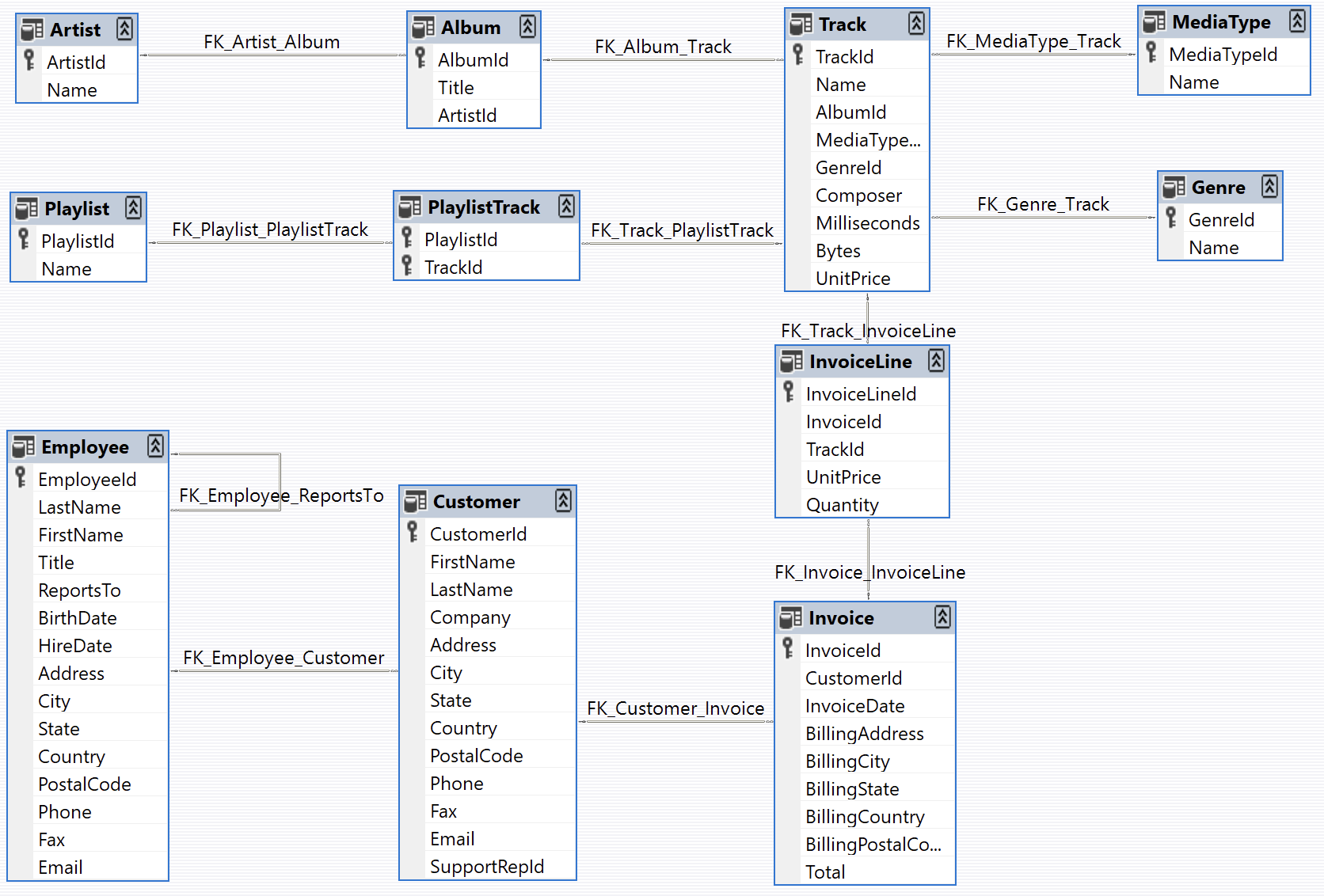
Chinook Database Schema
Chinook Database Schema
Agent
Our Pydantic AI agent (source) has access to the database through the providedexecute_sql tool and the
entire database schema is injected into the system prompt. The agent should be
able to use the tool to query data and summarize the results to help answer
questions about the dataset.
Before creating your eval, you will need to parameterize your agent so that you
can evaluate it with different models. In the this example we wrap our agent
creation logic in a function called
setup_agent that accepts a pydantic
Model
object. You
can reuse this pattern in your own setup, but it is not required.Tasks
To evaluate our agent, we curated a set of complex tasks and their ground truth answers that we can use to evaluate the quality of the agent (dataset here). For example, here is one of the tasks for our eval:
For each task, the agent should be evaluated on its ability to collect data
through SQL calls and pass through or give a high-quality summary of the correct
data for the task.
Writing the Eval
Evals ineval-protocol return a score between 0.0 and 1.0. For this example,
we will give either a score of 0 or 1 depending on whether the final answer from
the agent contains the same or well summarized information as the data shown in
the ground truth.
Reading the Dataset
Every eval ineval-protocol expects an input dataset of type List[EvaluationRow].
In our example, we define a collect_dataset
function
that helps us read tasks and ground truth answers from the dataset folder.
Generating a Score
Evals ineval-protocol return a score between 0.0 and 1.0. For this example,
we use an LLM-based judge to compare the agent’s response against the ground truth answer.
Here’s the complete scoring implementation from the test:
How the Scoring Works
-
Agent Factory: The
agent_factoryfunction creates a Pydantic AI agent using the model fromcompletion_params(provider is optional) -
LLM Judge: A separate Pydantic AI agent (
comparison_agent) is created to evaluate responses using a structured prompt -
Structured Output: The judge uses a Pydantic
Responsemodel to ensure consistent scoring format with both a score (0.0-1.0) and reasoning - Error Handling: The code checks for missing or empty assistant messages and assigns a score of 0.0
- Comparison: The judge compares the agent’s response against the ground truth and returns a structured evaluation
-
Retry Logic: Uses
output_retries=5to ensure reliable structured output from the judge
Creating a Leaderboard
Now that we have a scoring function, we can create a leaderboard.Step 1: Add Multiple Models
To compare different models, modify thecompletion_params in your @evaluation_test decorator to include multiple models. Set num_runs=3 to generate multiple samples per row, providing more robust evaluation results by running each test case 3 times:
@evaluation_test decorator changes
Step 2: Run the Evaluation
Execute your evaluation test to generate results across all models:- CLI
- VSCode
Step 3: View Results in Pivot View
After running the evaluation, you can analyze the results using the Pivot View. The pivot view allows you to:- Compare model performance across different metrics
- Create visualizations and charts
- Export results as images or CSV files
- Filter and aggregate data by various dimensions
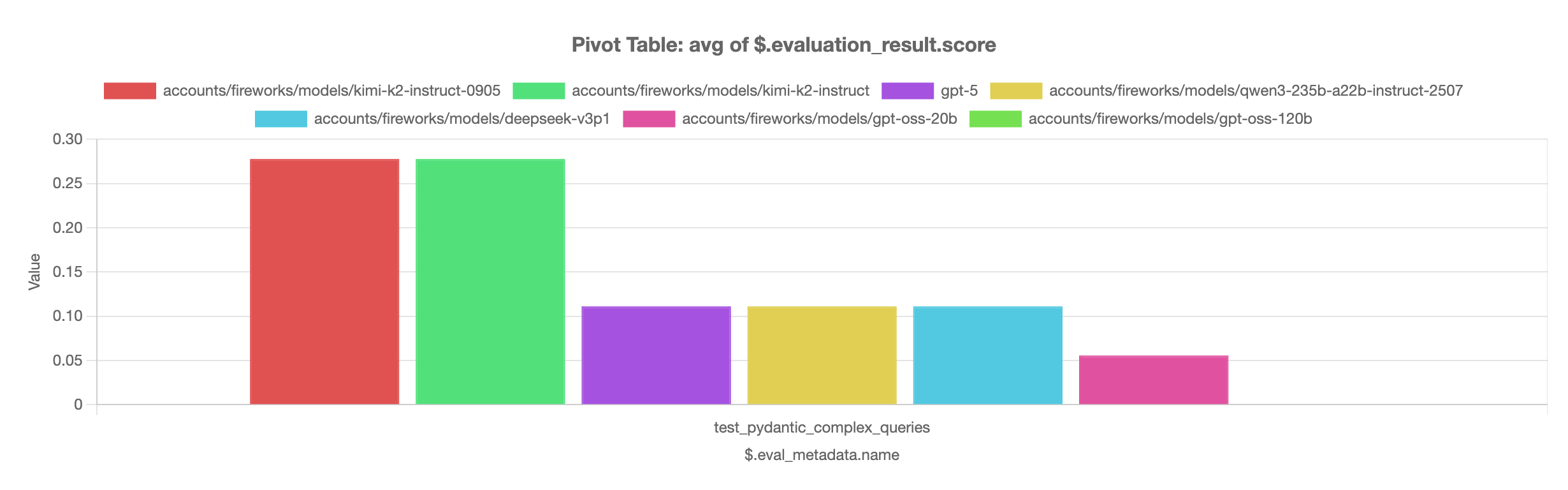
kimi-k2-instruct-0905 and kimi-k2-instruct models perform best on the complex queries evaluation, significantly outperforming other models in the comparison.