> ## Documentation Index
> Fetch the complete documentation index at: https://evalprotocol.io/llms.txt
> Use this file to discover all available pages before exploring further.
# GSM8K Fine-tuning Quickstart (Small Model)
> Run pytest to materialize the evaluator and dataset, then launch a local Reinforcement Fine-Tuning job on a small model.
Run GSM8K locally end-to-end:
* Materialize a GSM8K evaluator and dataset with `pytest`
* Kick off a Reinforcement Fine-Tuning (RFT) job for a small base model
* Track accuracy improvements by re-running the evaluator
Running the GSM8K tutorial in Google Colab requires a Google account with billing enabled (credit card on file). Fireworks usage also bills against your account once you supply `FIREWORKS_API_KEY`. 👉 [Run the GSM8K Fine-tuning Colab](https://colab.research.google.com/drive/16xrb9rx6AoAEOtrDXumzo71HjhunaoPi#scrollTo=CP18QX4tgi-0)
## Prerequisites
* Python 3.10+
* Local Python environment with Jupyter support (VS Code, JupyterLab, or classic notebook)
* `FIREWORKS_API_KEY` with permissions to launch RFT jobs (stored in your shell or `.env`)
* Basic familiarity with GSM8K-style math reasoning tasks
Install the latest `eval-protocol` SDK directly from the main branch and make sure `pytest` is on the path. Upgrade `pip` first to avoid resolver issues.
```bash theme={null}
python -m pip install --upgrade pip
python -m pip install pytest git+https://github.com/eval-protocol/python-sdk.git
```
Download the evaluation assets we will use to kick off the job. Copy the GSM8K pytest script and sample dataset into a working directory (here `gsm8k_artifacts/`). The snippet below is safe to run inside a notebook cell or standalone script and ensures the files land where later steps expect them.
```python tutorial/download_gsm8k_assets.py theme={null}
from pathlib import Path
import requests
ARTIFACT_ROOT = Path("gsm8k_artifacts")
TEST_PATH = ARTIFACT_ROOT / "tests" / "pytest" / "gsm8k" / "test_pytest_math_example.py"
DATASET_PATH = ARTIFACT_ROOT / "development" / "gsm8k_sample.jsonl"
files_to_download = {
TEST_PATH: "https://raw.githubusercontent.com/eval-protocol/python-sdk/main/tests/pytest/gsm8k/test_pytest_math_example.py",
DATASET_PATH: "https://raw.githubusercontent.com/eval-protocol/python-sdk/main/development/gsm8k_sample.jsonl",
}
for local_path, url in files_to_download.items():
local_path.parent.mkdir(parents=True, exist_ok=True)
response = requests.get(url, timeout=30)
response.raise_for_status()
local_path.write_bytes(response.content)
print(f"Saved {url} -> {local_path}")
```
Expected output:
```
Saved https://raw.githubusercontent.com/.../test_pytest_math_example.py -> gsm8k_artifacts/tests/pytest/gsm8k/test_pytest_math_example.py
Saved https://raw.githubusercontent.com/.../gsm8k_sample.jsonl -> gsm8k_artifacts/development/gsm8k_sample.jsonl
```
Execute the evaluation that materializes the evaluator and dataset. Point the test at the artifacts folder you created in the previous step.
```bash theme={null}
cd gsm8k_artifacts
ep local-test
```
This command discovers and runs your `@evaluation_test` with pytest.
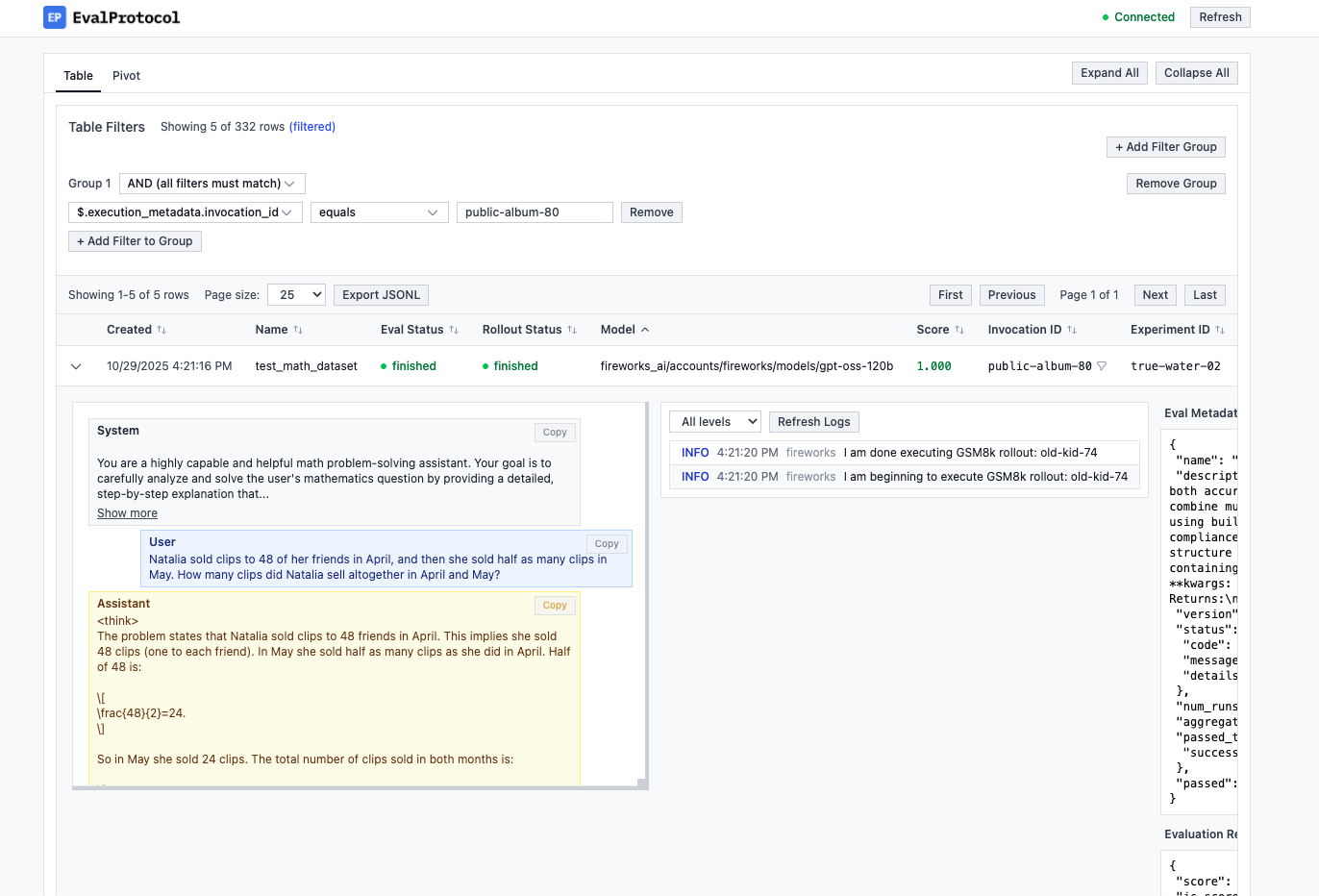
You should see log output for each rollout and navigate to [http://localhost:8000](http://localhost:8000) to see the Eval Protocol UI and inspect results.
 Store your Fireworks API key in the environment so the CLI can authenticate. The command below keeps the key confined to the current shell session.
```bash theme={null}
export FIREWORKS_API_KEY=""
```
Alternatively, load it from a secrets manager or `.env` file if your workflow already manages credentials securely.
Trigger the `eval-protocol` CLI to start a Reinforcement Fine-Tuning job using the evaluator and dataset registered above. Replace the base model to experiment with other policies.
```bash theme={null}
cd ..
eval-protocol create rft --base-model accounts/fireworks/models/qwen3-0p6b
```
The CLI reports dashboard links for the evaluator, dataset, and RFT job so you can monitor rollouts.
Store your Fireworks API key in the environment so the CLI can authenticate. The command below keeps the key confined to the current shell session.
```bash theme={null}
export FIREWORKS_API_KEY=""
```
Alternatively, load it from a secrets manager or `.env` file if your workflow already manages credentials securely.
Trigger the `eval-protocol` CLI to start a Reinforcement Fine-Tuning job using the evaluator and dataset registered above. Replace the base model to experiment with other policies.
```bash theme={null}
cd ..
eval-protocol create rft --base-model accounts/fireworks/models/qwen3-0p6b
```
The CLI reports dashboard links for the evaluator, dataset, and RFT job so you can monitor rollouts.
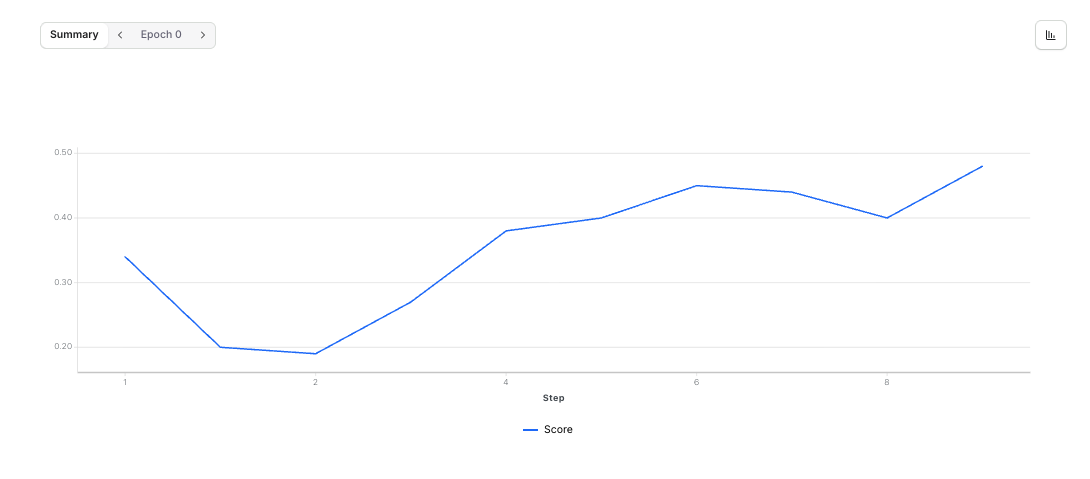 ## Track accuracy over time
* Re-run the `ep local-test` command periodically to evaluate the latest checkpoint against the GSM8K slice.
* Adjust reward shaping or parsing logic inside `test_pytest_math_example.py` to fit your formatting expectations.
* Swap in a custom dataset JSONL by editing the local artifact or passing `--dataset-jsonl` when creating the RFT job.
## What’s happening under the hood
* The evaluation tests a small GSM8K slice with a numeric-check reward and registers an evaluator plus dataset with your local API.
* The `create rft` command wires those resources into a Reinforcement Fine-Tuning job for the specified base model.
* As training progresses, evaluation scores reflect improved accuracy on the held-out set, letting you iterate quickly before scaling up.
## Next steps
* Parameterize base models and dataset paths in scripts or notebooks to make repeated experiments easier.
* Automate the evaluation loop in CI so new policies are validated before deployment.
* Promote successful evaluators and datasets to shared registries once the workflow is stable.
Ready to try your own? For a ready-to-run project with all files included, clone the [GSM8K Quickstart Repository](https://github.com/eval-protocol/quickstart-gsm8k) and get started now!
## Track accuracy over time
* Re-run the `ep local-test` command periodically to evaluate the latest checkpoint against the GSM8K slice.
* Adjust reward shaping or parsing logic inside `test_pytest_math_example.py` to fit your formatting expectations.
* Swap in a custom dataset JSONL by editing the local artifact or passing `--dataset-jsonl` when creating the RFT job.
## What’s happening under the hood
* The evaluation tests a small GSM8K slice with a numeric-check reward and registers an evaluator plus dataset with your local API.
* The `create rft` command wires those resources into a Reinforcement Fine-Tuning job for the specified base model.
* As training progresses, evaluation scores reflect improved accuracy on the held-out set, letting you iterate quickly before scaling up.
## Next steps
* Parameterize base models and dataset paths in scripts or notebooks to make repeated experiments easier.
* Automate the evaluation loop in CI so new policies are validated before deployment.
* Promote successful evaluators and datasets to shared registries once the workflow is stable.
Ready to try your own? For a ready-to-run project with all files included, clone the [GSM8K Quickstart Repository](https://github.com/eval-protocol/quickstart-gsm8k) and get started now!