> ## Documentation Index
> Fetch the complete documentation index at: https://evalprotocol.io/llms.txt
> Use this file to discover all available pages before exploring further.
# Training with TRL
> Connect environments to TRL to train language models
Eval Protocol makes it easy to connect your environments to open‑source trainers like [TRL](https://huggingface.co/docs/trl/en/index) and train language models on interactive environments such as web navigation, text games, and custom simulators. Our TRL integration lets Eval Protocol handle rollouts with any [OpenEnv](https://github.com/meta-pytorch/OpenEnv/tree/main) environment (and other Eval Protocol rollout processors), while TRL handles optimization, gradients, and checkpoints.
**Supported environments today:**
* **OpenEnv environments** via `OpenEnvRolloutProcessor` (BrowserGym, Echo, TextArena, Atari-style games, coding envs, and more).
* **Other Eval Protocol tests** that expose token IDs and rewards through a rollout processor (for example `SingleTurnRolloutProcessor`), with more trainers and environments added over time.
## Why Use Eval Protocol for TRL Training?
**Eval Protocol handles the rollouts:**
* Environment management (Docker containers, lifecycle)
* Rollout execution (observation → LLM → action → environment)
* Task Rotation
* Reward collection and formatting
* Concurrency control
**TRL handles training:**
* GRPO optimization
* Model updates
* Gradient computation
* Checkpointing
**You just need to:**
* Define how to build prompts from observations
* Define how to parse LLM outputs into actions
* Configure your environment and training parameters
## Architecture
At a high level, TRL and Eval Protocol split responsibilities:
* **TRL (GRPOTrainer)** owns the training loop: it calls a `rollout_func`, computes losses and gradients, and updates the model.
* **Eval Protocol** owns the rollout loop: it turns TRL prompts into `EvaluationRow`s, runs environments (for example via `OpenEnvRolloutProcessor`), calls your model through vLLM, and returns token IDs and rewards.
* **Environments** (OpenEnv or other Eval Protocol tests) are configured once in a `@evaluation_test` file, which Eval Protocol reuses both for offline evals and for TRL training.
When you pass a `rollout_func` created by `create_openenv_vllm_rollout_func` into `GRPOTrainer`, each training step looks like:
1. TRL calls `rollout_func(prompts, trainer)`.
2. Eval Protocol builds `EvaluationRow`s and runs rollouts using the configured rollout processor.
3. The `@evaluation_test` is executed to compute `evaluation_result.score` for each row.
4. Eval Protocol returns token IDs and scores to TRL, which computes gradients and updates the model.
## Prerequisites
### 1. Install Dependencies
```bash theme={null}
# Recommended: Eval Protocol with TRL + OpenEnv extras
pip install "eval-protocol[trl,openenv]"
# This installs:
# - TRL + friends: trl, transformers, peft, accelerate, torch (as needed)
# - OpenEnv packages: openenv-core, openenv, openenv-browsergym-env
# You do NOT need to clone the OpenEnv repo just to use hub or remote environments.
# Or install pieces separately
pip install "eval-protocol[trl]"
pip install openenv-core
pip install "openenv @ git+https://github.com/meta-pytorch/OpenEnv.git"
pip install "openenv-browsergym-env @ git+https://github.com/meta-pytorch/OpenEnv.git#subdirectory=src/envs/browsergym_env"
```
### 2. (Optional) Build local BrowserGym Docker images
You only need this step if you want to run **BrowserGym locally in Docker**.\
If you are using environments from the **Hugging Face Hub** (for example `EchoEnv.from_hub(...)`) or a **remote HTTP server/Space** via `base_url=...`, you can skip this section.
```bash theme={null}
# Clone OpenEnv (only needed for building local images)
git clone https://github.com/meta-pytorch/OpenEnv.git
cd OpenEnv
# Build OpenEnv base image
docker build -t openenv-base:latest -f src/core/containers/images/Dockerfile .
# Build BrowserGym environment
docker build -t browsergym-env:latest -f src/envs/browsergym_env/server/Dockerfile .
```
### 3. Start vLLM Server
Start TRL's vLLM server on a separate GPU:
```bash theme={null}
# Use an INSTRUCT model for better instruction following
CUDA_VISIBLE_DEVICES=0 trl vllm-serve \
--model Qwen/Qwen2.5-7B-Instruct \
--port 8000
```
Use a separate GPU for vLLM inference (GPU 0) and training (GPU 1) for best performance.
### 4. Setup Environment (BrowserGym + MiniWoB++ example)
This step is only required if you are training on **MiniWoB++ BrowserGym tasks** locally. For other environments (Echo, TextArena, remote BrowserGym on the hub/Spaces), you can skip it.
For MiniWoB++ tasks, serve the HTML locally:
```bash theme={null}
# Clone MiniWoB++ (if you don't have it yet)
git clone https://github.com/Farama-Foundation/miniwob-plusplus.git
# From the cloned repo root:
cd miniwob-plusplus/miniwob/html
python -m http.server 8888 --bind 0.0.0.0
```
Set environment variables:
```bash theme={null}
export MINIWOB_URL="http://host.docker.internal:8888/miniwob/" # macOS
# or
export MINIWOB_URL="http://172.17.0.1:8888/miniwob/" # Linux
```
## Reusing Eval Protocol tests with TRL
The biggest value of this integration is that you can **reuse your existing `@evaluation_test` files** for training:
* The Eval Protocol test owns the **environment wiring** (for example `OpenEnvRolloutProcessor` + BrowserGym/Echo/TextArena config).
* The test body owns the **reward logic** (it sets `row.evaluation_result`).
* TRL just points at that test by module path and reuses both environment and scoring.
You can see a concrete example in the Eval Protocol Python SDK repo at:
[tests.pytest.test\_openenv\_browsergym\_eval](https://github.com/eval-protocol/python-sdk/blob/main/tests/pytest/test_openenv_browsergym_eval.py).
Eval Protocol’s `create_openenv_vllm_rollout_func` helper:
* Looks up your `@evaluation_test` via its `env_path` (for example `"tests.pytest.test_openenv_browsergym_eval"`).
* Reuses the attached `OpenEnvRolloutProcessor` configuration (env client, tasks, env vars, timeouts, etc.).
* Runs the test function itself to populate `row.evaluation_result`.
* Returns a `rollout_func` that produces token IDs and rewards in the format TRL expects.
This means you can:
* Add a new environment by writing a **single `@evaluation_test`**.
* Use the same test in:
* Offline evals and dashboards (`ep logs`).
* TRL training, by pointing `env_path` at that test.
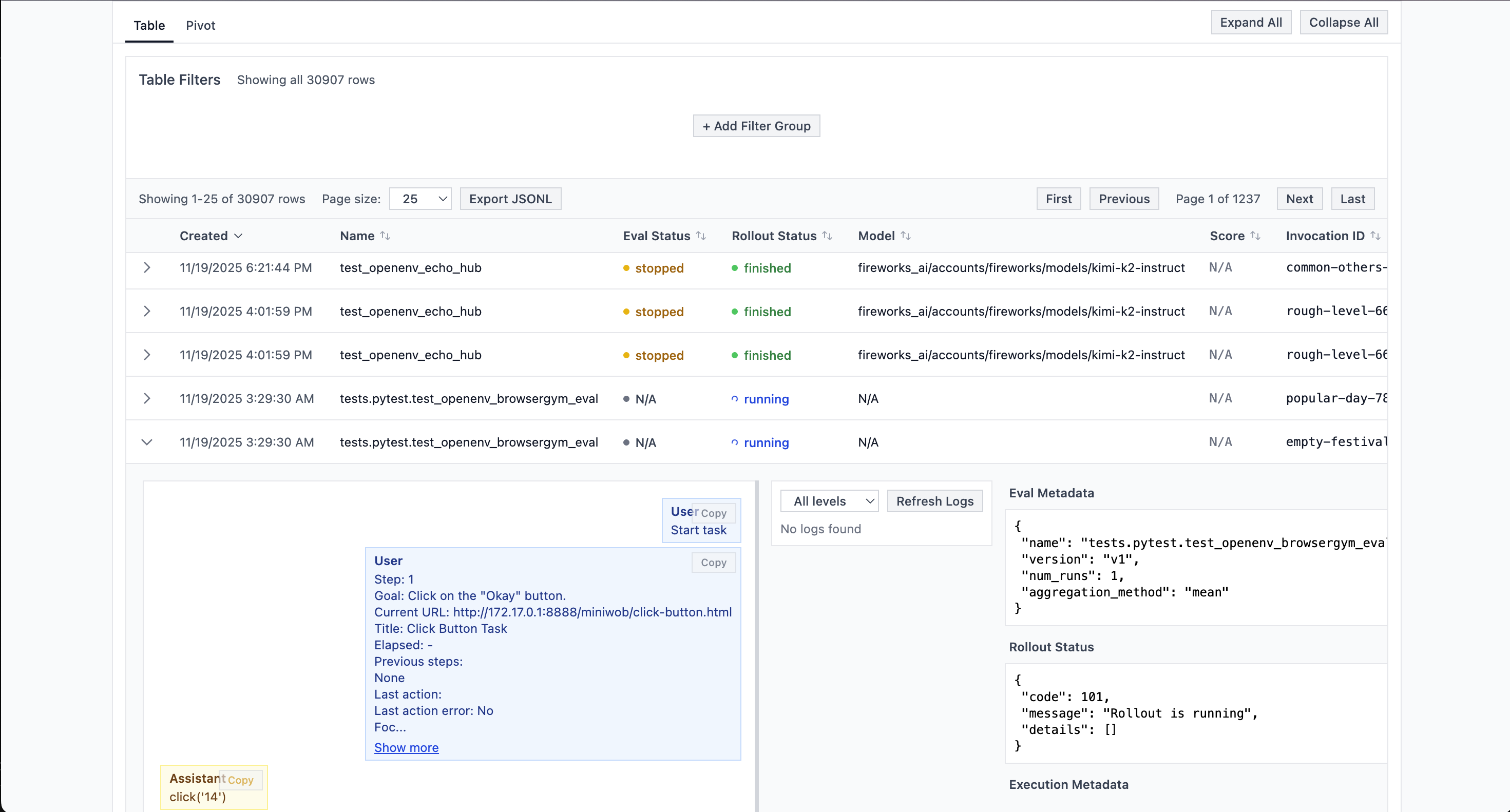
## Inspecting TRL rollouts in the Logs UI
Because all rollouts go through Eval Protocol, every TRL training step that uses this integration is also visible in the **Eval Protocol Logs UI**:
* Each call to `rollout_func` creates one or more `EvaluationRow`s, just like a normal eval run.
* Those rows are logged with `EvalMetadata` so you can filter by eval name, time, and status.
* You can inspect the full message history, actions, rewards, and token usage for each rollout.
 ## Quick Start: BrowserGym + TRL (reusing an eval test)
Below is a minimal example that trains on BrowserGym MiniWoB++ tasks by reusing an existing Eval Protocol test (`tests.pytest.test_openenv_browsergym_eval`) that already configures `OpenEnvRolloutProcessor` and reward logic.
```python train_browsergym_trl.py theme={null}
from typing import Any, List
from datasets import Dataset
from transformers import AutoTokenizer
from trl import GRPOConfig, GRPOTrainer
from peft import LoraConfig
from eval_protocol.pytest.integrations.openenv_trl_vllm import create_openenv_vllm_rollout_func
from envs.browsergym_env import BrowserGymAction
MODEL = "Qwen/Qwen2.5-7B-Instruct"
VLLM_URL = "http://localhost:8000"
# Module path to the Eval Protocol @evaluation_test we want to reuse.
EVAL_ENV_PATH = "tests.pytest.test_openenv_browsergym_eval"
# 1. Define prompt builder (observation → text for LLM)
def build_prompt(obs: Any, step: int, history: List[str]) -> str:
goal = getattr(obs, "goal", "") or ""
url = getattr(obs, "url", "") or "(unknown)"
text = (getattr(obs, "text", "") or "")[:1500]
history_block = "\n".join(history[-4:]) if history else "None"
return (
f"Step {step}\n"
f"Goal: {goal}\n"
f"URL: {url}\n"
f"Previous steps:\n{history_block}\n\n"
f"Page excerpt:\n{text}\n\n"
"Reply with a single BrowserGym action, e.g., click('13') or noop()."
)
# 2. Define action parser (LLM text → environment action)
def parse_action(text: str) -> BrowserGymAction:
import re
match = re.search(r"[A-Za-z_]+\\s*\\(.*\\)", text)
if match:
return BrowserGymAction(action_str=match.group(0))
return BrowserGymAction(action_str="noop()")
# 3. Define reward function (uses eval_protocol evaluation scores)
def reward_func(completions, **kwargs):
"""
Reward per episode taken from eval_protocol's evaluation_result.score.
The rollout_func runs the @evaluation_test for each EvaluationRow and
exposes the score as `eval_score`.
"""
eval_scores = kwargs.get("eval_score") or []
if eval_scores:
return [float(s) for s in eval_scores]
return [0.0] * len(completions)
# 4. Create rollout function (Eval Protocol handles OpenEnv + vLLM)
rollout_func = create_openenv_vllm_rollout_func(
env_factory=None,
env_client_cls=None, # taken from the @evaluation_test
prompt_builder=build_prompt,
action_parser=parse_action,
vllm_base_url=VLLM_URL,
vllm_model=MODEL,
env_path=EVAL_ENV_PATH, # reuse OpenEnvRolloutProcessor config + rewards
max_steps=6,
completion_params={
"temperature": 0.7,
"max_tokens": 1024,
},
concurrency=2,
)
# 5. Setup TRL trainer
tokenizer = AutoTokenizer.from_pretrained(MODEL)
dataset = Dataset.from_dict({"prompt": ["Start task"] * 6})
training_args = GRPOConfig(
output_dir="outputs/browsergym",
per_device_train_batch_size=2,
num_generations=2,
num_train_epochs=1,
learning_rate=5e-6,
max_completion_length=100,
max_prompt_length=4096,
logging_steps=1,
use_vllm=True,
vllm_mode="colocate", # or "server" if you use a separate vLLM server
vllm_gpu_memory_utilization=0.5,
)
trainer = GRPOTrainer(
model=MODEL,
args=training_args,
train_dataset=dataset,
processing_class=tokenizer,
reward_funcs=reward_func,
rollout_func=rollout_func, # ← Eval Protocol handles OpenEnv + vLLM here
peft_config=LoraConfig(r=16, lora_alpha=16, target_modules="all-linear"),
)
def main():
trainer.train()
if __name__ == "__main__":
main()
```
## Running the Training
```bash theme={null}
# Start vLLM server (GPU 0)
CUDA_VISIBLE_DEVICES=0 trl vllm-serve --model Qwen/Qwen2.5-7B-Instruct --port 8000
# In another terminal, start MiniWoB server
cd miniwob-plusplus/miniwob/html
python -m http.server 8888 --bind 0.0.0.0
# In another terminal, run training (GPU 1)
CUDA_VISIBLE_DEVICES=1 PYTHONUNBUFFERED=1 python train_browsergym.py
```
## How It Works
When you call `create_openenv_vllm_rollout_func()`, eval-protocol creates a function that TRL's trainer will call during training. Here's what happens:
1. **TRL calls `rollout_func(prompts, trainer)`** with a batch of prompts
2. **eval-protocol creates evaluation rows** from the prompts (one row per generation)
3. **OpenEnvRolloutProcessor executes rollouts**:
* Creates Docker containers for environments
* Runs the agent loop: observation → LLM → action → environment
* Collects rewards and tokens from each step
4. **eval-protocol formats results** into TRL-compatible format (token IDs + rewards)
5. **TRL uses the results** to compute policy gradients and update the model
You don't need to worry about Docker management, concurrency, or reward collection—eval-protocol handles it all!
## Configuration Parameters
### Rollout Function Parameters
OpenEnv environment client class (e.g., `BrowserGymEnv`, `TextArenaEnv`)
Function that converts observation to text prompt for the LLM
Function that converts LLM text output to environment action
URL of the TRL vLLM server
Model name on the vLLM server
List of tasks to rotate through during training
Environment variable name for task selection (required when `tasks` is provided)
Environment variables to pass to Docker containers
Docker image for the environment
Maximum steps per episode
LLM sampling parameters (temperature, max\_tokens, etc.)
Maximum concurrent rollouts (defaults to batch size)
### GRPO Training Parameters
Batch size per device
Number of rollouts per prompt (must divide evenly into batch size)
Learning rate for training
Sampling temperature for generation
Maximum tokens per generation
Must be `True` to use vLLM server
Must be `"server"` to use separate vLLM server
URL of the vLLM server
## Best Practices
### 1. Use Instruct Models
Use instruction-tuned models (e.g., `Qwen2.5-7B-Instruct`) rather than base models for better instruction following:
```python theme={null}
MODEL = "Qwen/Qwen2.5-7B-Instruct" # ✅ Good
# MODEL = "Qwen/Qwen2.5-7B" # ❌ Base model may not follow instructions well
```
### 2. Separate GPUs for Inference and Training
Run vLLM inference on one GPU and training on another:
```bash theme={null}
# GPU 0: vLLM inference
CUDA_VISIBLE_DEVICES=0 trl vllm-serve --model MODEL --port 8000
# GPU 1: Training
CUDA_VISIBLE_DEVICES=1 python train.py
```
### 3. Use LoRA for Efficiency
LoRA reduces memory usage and speeds up training:
```python theme={null}
peft_config = LoraConfig(
r=16, # Rank (higher = more parameters)
lora_alpha=16,
target_modules="all-linear", # Apply to all linear layers
lora_dropout=0.05,
bias="none",
task_type="CAUSAL_LM",
)
```
### 4. Balance Batch Size and Generations
Ensure `per_device_train_batch_size` is divisible by `num_generations`:
```python theme={null}
per_device_train_batch_size=4 # ✅ Divisible by num_generations
num_generations=2
```
### 5. Monitor Rewards
Track average rewards to ensure learning progress:
```python theme={null}
def reward_func(completions, **kwargs):
step_rewards = kwargs.get("step_rewards", [])
avg_reward = sum(step_rewards) / len(step_rewards) if step_rewards else 0.0
print(f"Average reward: {avg_reward:.2f}")
return [float(r) for r in step_rewards]
```
## Troubleshooting
### vLLM Server Not Found
**Error**: `Connection refused to http://localhost:8000`
**Solution**: Ensure vLLM server is running:
```bash theme={null}
CUDA_VISIBLE_DEVICES=0 trl vllm-serve --model MODEL --port 8000
```
### Docker Container Fails
**Error**: `RuntimeError: Failed to start Docker container`
**Solution**:
* Verify Docker image exists: `docker images | grep browsergym-env`
* Check container logs: `docker logs `
* Ensure environment variables are correct
### Out of Memory
**Error**: `CUDA out of memory`
**Solution**:
* Use LoRA instead of full fine-tuning
* Reduce `per_device_train_batch_size`
* Reduce `max_completion_length`
* Enable `gradient_checkpointing=True`
### Low Rewards
If rewards remain low:
* Verify your reward function is correct
* Check that environment tasks are solvable
* Review LLM outputs in rollout logs
* Adjust temperature (lower = more deterministic)
* Improve prompt engineering
## Advanced: Custom Reward Functions
You can implement custom reward shaping:
```python theme={null}
def custom_reward_func(completions, **kwargs):
"""Custom reward with shaping."""
step_rewards = kwargs.get("step_rewards", [])
shaped_rewards = []
for reward in step_rewards:
# Reward shaping: bonus for positive rewards
shaped = reward
if reward > 0:
shaped += 0.1 # Bonus for any success
shaped_rewards.append(shaped)
return shaped_rewards
```
## Resources
* [TRL Documentation](https://huggingface.co/docs/trl)
* [GRPO Paper](https://arxiv.org/abs/2402.03300)
* [OpenEnv Documentation](https://meta-pytorch.org/OpenEnv/)
* [eval-protocol TRL Integration](https://github.com/eval-protocol/python-sdk/blob/main/eval_protocol/pytest/integrations/openenv_trl_vllm.py)
* [Example Training Script](https://github.com/eval-protocol/python-sdk/blob/main/examples/trl/train_browsergym.py)
## Quick Start: BrowserGym + TRL (reusing an eval test)
Below is a minimal example that trains on BrowserGym MiniWoB++ tasks by reusing an existing Eval Protocol test (`tests.pytest.test_openenv_browsergym_eval`) that already configures `OpenEnvRolloutProcessor` and reward logic.
```python train_browsergym_trl.py theme={null}
from typing import Any, List
from datasets import Dataset
from transformers import AutoTokenizer
from trl import GRPOConfig, GRPOTrainer
from peft import LoraConfig
from eval_protocol.pytest.integrations.openenv_trl_vllm import create_openenv_vllm_rollout_func
from envs.browsergym_env import BrowserGymAction
MODEL = "Qwen/Qwen2.5-7B-Instruct"
VLLM_URL = "http://localhost:8000"
# Module path to the Eval Protocol @evaluation_test we want to reuse.
EVAL_ENV_PATH = "tests.pytest.test_openenv_browsergym_eval"
# 1. Define prompt builder (observation → text for LLM)
def build_prompt(obs: Any, step: int, history: List[str]) -> str:
goal = getattr(obs, "goal", "") or ""
url = getattr(obs, "url", "") or "(unknown)"
text = (getattr(obs, "text", "") or "")[:1500]
history_block = "\n".join(history[-4:]) if history else "None"
return (
f"Step {step}\n"
f"Goal: {goal}\n"
f"URL: {url}\n"
f"Previous steps:\n{history_block}\n\n"
f"Page excerpt:\n{text}\n\n"
"Reply with a single BrowserGym action, e.g., click('13') or noop()."
)
# 2. Define action parser (LLM text → environment action)
def parse_action(text: str) -> BrowserGymAction:
import re
match = re.search(r"[A-Za-z_]+\\s*\\(.*\\)", text)
if match:
return BrowserGymAction(action_str=match.group(0))
return BrowserGymAction(action_str="noop()")
# 3. Define reward function (uses eval_protocol evaluation scores)
def reward_func(completions, **kwargs):
"""
Reward per episode taken from eval_protocol's evaluation_result.score.
The rollout_func runs the @evaluation_test for each EvaluationRow and
exposes the score as `eval_score`.
"""
eval_scores = kwargs.get("eval_score") or []
if eval_scores:
return [float(s) for s in eval_scores]
return [0.0] * len(completions)
# 4. Create rollout function (Eval Protocol handles OpenEnv + vLLM)
rollout_func = create_openenv_vllm_rollout_func(
env_factory=None,
env_client_cls=None, # taken from the @evaluation_test
prompt_builder=build_prompt,
action_parser=parse_action,
vllm_base_url=VLLM_URL,
vllm_model=MODEL,
env_path=EVAL_ENV_PATH, # reuse OpenEnvRolloutProcessor config + rewards
max_steps=6,
completion_params={
"temperature": 0.7,
"max_tokens": 1024,
},
concurrency=2,
)
# 5. Setup TRL trainer
tokenizer = AutoTokenizer.from_pretrained(MODEL)
dataset = Dataset.from_dict({"prompt": ["Start task"] * 6})
training_args = GRPOConfig(
output_dir="outputs/browsergym",
per_device_train_batch_size=2,
num_generations=2,
num_train_epochs=1,
learning_rate=5e-6,
max_completion_length=100,
max_prompt_length=4096,
logging_steps=1,
use_vllm=True,
vllm_mode="colocate", # or "server" if you use a separate vLLM server
vllm_gpu_memory_utilization=0.5,
)
trainer = GRPOTrainer(
model=MODEL,
args=training_args,
train_dataset=dataset,
processing_class=tokenizer,
reward_funcs=reward_func,
rollout_func=rollout_func, # ← Eval Protocol handles OpenEnv + vLLM here
peft_config=LoraConfig(r=16, lora_alpha=16, target_modules="all-linear"),
)
def main():
trainer.train()
if __name__ == "__main__":
main()
```
## Running the Training
```bash theme={null}
# Start vLLM server (GPU 0)
CUDA_VISIBLE_DEVICES=0 trl vllm-serve --model Qwen/Qwen2.5-7B-Instruct --port 8000
# In another terminal, start MiniWoB server
cd miniwob-plusplus/miniwob/html
python -m http.server 8888 --bind 0.0.0.0
# In another terminal, run training (GPU 1)
CUDA_VISIBLE_DEVICES=1 PYTHONUNBUFFERED=1 python train_browsergym.py
```
## How It Works
When you call `create_openenv_vllm_rollout_func()`, eval-protocol creates a function that TRL's trainer will call during training. Here's what happens:
1. **TRL calls `rollout_func(prompts, trainer)`** with a batch of prompts
2. **eval-protocol creates evaluation rows** from the prompts (one row per generation)
3. **OpenEnvRolloutProcessor executes rollouts**:
* Creates Docker containers for environments
* Runs the agent loop: observation → LLM → action → environment
* Collects rewards and tokens from each step
4. **eval-protocol formats results** into TRL-compatible format (token IDs + rewards)
5. **TRL uses the results** to compute policy gradients and update the model
You don't need to worry about Docker management, concurrency, or reward collection—eval-protocol handles it all!
## Configuration Parameters
### Rollout Function Parameters
OpenEnv environment client class (e.g., `BrowserGymEnv`, `TextArenaEnv`)
Function that converts observation to text prompt for the LLM
Function that converts LLM text output to environment action
URL of the TRL vLLM server
Model name on the vLLM server
List of tasks to rotate through during training
Environment variable name for task selection (required when `tasks` is provided)
Environment variables to pass to Docker containers
Docker image for the environment
Maximum steps per episode
LLM sampling parameters (temperature, max\_tokens, etc.)
Maximum concurrent rollouts (defaults to batch size)
### GRPO Training Parameters
Batch size per device
Number of rollouts per prompt (must divide evenly into batch size)
Learning rate for training
Sampling temperature for generation
Maximum tokens per generation
Must be `True` to use vLLM server
Must be `"server"` to use separate vLLM server
URL of the vLLM server
## Best Practices
### 1. Use Instruct Models
Use instruction-tuned models (e.g., `Qwen2.5-7B-Instruct`) rather than base models for better instruction following:
```python theme={null}
MODEL = "Qwen/Qwen2.5-7B-Instruct" # ✅ Good
# MODEL = "Qwen/Qwen2.5-7B" # ❌ Base model may not follow instructions well
```
### 2. Separate GPUs for Inference and Training
Run vLLM inference on one GPU and training on another:
```bash theme={null}
# GPU 0: vLLM inference
CUDA_VISIBLE_DEVICES=0 trl vllm-serve --model MODEL --port 8000
# GPU 1: Training
CUDA_VISIBLE_DEVICES=1 python train.py
```
### 3. Use LoRA for Efficiency
LoRA reduces memory usage and speeds up training:
```python theme={null}
peft_config = LoraConfig(
r=16, # Rank (higher = more parameters)
lora_alpha=16,
target_modules="all-linear", # Apply to all linear layers
lora_dropout=0.05,
bias="none",
task_type="CAUSAL_LM",
)
```
### 4. Balance Batch Size and Generations
Ensure `per_device_train_batch_size` is divisible by `num_generations`:
```python theme={null}
per_device_train_batch_size=4 # ✅ Divisible by num_generations
num_generations=2
```
### 5. Monitor Rewards
Track average rewards to ensure learning progress:
```python theme={null}
def reward_func(completions, **kwargs):
step_rewards = kwargs.get("step_rewards", [])
avg_reward = sum(step_rewards) / len(step_rewards) if step_rewards else 0.0
print(f"Average reward: {avg_reward:.2f}")
return [float(r) for r in step_rewards]
```
## Troubleshooting
### vLLM Server Not Found
**Error**: `Connection refused to http://localhost:8000`
**Solution**: Ensure vLLM server is running:
```bash theme={null}
CUDA_VISIBLE_DEVICES=0 trl vllm-serve --model MODEL --port 8000
```
### Docker Container Fails
**Error**: `RuntimeError: Failed to start Docker container`
**Solution**:
* Verify Docker image exists: `docker images | grep browsergym-env`
* Check container logs: `docker logs `
* Ensure environment variables are correct
### Out of Memory
**Error**: `CUDA out of memory`
**Solution**:
* Use LoRA instead of full fine-tuning
* Reduce `per_device_train_batch_size`
* Reduce `max_completion_length`
* Enable `gradient_checkpointing=True`
### Low Rewards
If rewards remain low:
* Verify your reward function is correct
* Check that environment tasks are solvable
* Review LLM outputs in rollout logs
* Adjust temperature (lower = more deterministic)
* Improve prompt engineering
## Advanced: Custom Reward Functions
You can implement custom reward shaping:
```python theme={null}
def custom_reward_func(completions, **kwargs):
"""Custom reward with shaping."""
step_rewards = kwargs.get("step_rewards", [])
shaped_rewards = []
for reward in step_rewards:
# Reward shaping: bonus for positive rewards
shaped = reward
if reward > 0:
shaped += 0.1 # Bonus for any success
shaped_rewards.append(shaped)
return shaped_rewards
```
## Resources
* [TRL Documentation](https://huggingface.co/docs/trl)
* [GRPO Paper](https://arxiv.org/abs/2402.03300)
* [OpenEnv Documentation](https://meta-pytorch.org/OpenEnv/)
* [eval-protocol TRL Integration](https://github.com/eval-protocol/python-sdk/blob/main/eval_protocol/pytest/integrations/openenv_trl_vllm.py)
* [Example Training Script](https://github.com/eval-protocol/python-sdk/blob/main/examples/trl/train_browsergym.py)